Angelista Font: Handwritten Script for Digital Branding
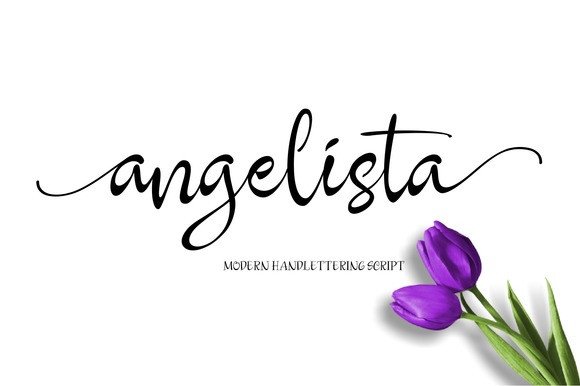
When designing conversion-focused websites and digital brand experiences, the choice of typography often dictates the emotional temperature of the interface. As web designers and UI creators, we constantly search for typefaces that balance aesthetic warmth with functional clarity. Angelista is a handwritten font that bridges this gap effectively. With over 250 handcrafted glyphs and smooth, curvy letterforms, this script amp offers a distinctively human touch that feels organic rather than manufactured. For digital product creators building landing pages, online stores, or personal brands, Angelista provides a versatile solution for establishing visual hierarchy without sacrificing the professional polish required for modern web design.
Visual Characteristics and Digital Personality
Angelista distinguishes itself through its fluid connectivity and generous x-height, two critical factors for screen readability. Unlike jagged or overly condensed script fonts that struggle at smaller sizes, Angelista maintains open counters and consistent stroke width. This makes it exceptionally legible on high-resolution displays and mobile screens alike. The personality of the typeface leans towards approachable elegance; it is neither too formal nor too childish. This neutrality allows it to adapt to various brand tones, from boutique e-commerce shops to wellness coaching platforms. The inclusion of extensive alternates and ligatures enables designers to customize word shapes, preventing the repetitive patterns that often make digital scripts look robotic. By utilizing these OpenType features, you can create logo treatments and hero headers that feel bespoke and intentionally crafted.
Strategic Placement in Web Layouts
In UI design, knowing where not to use a display font is just as important as knowing where to use it. Angelista performs best as an accent typeface rather than a workhorse for body copy. Its primary strength lies in guiding user attention through specific layout zones:
- Hero Sections: Use Angelista for the main value proposition or emotional hook. The handwritten style creates an immediate personal connection before the user reads the supporting sans serif details.
- Call-to-Action Accents: While buttons should generally remain in highly legible sans serif fonts, placing an Angelista annotation like "Start here" or "Limited offer" near a CTA can increase click-through rates by adding a layer of urgency and human endorsement.
- Testimonial Headers: Social proof relies on authenticity. Using this handwritten font for quote attributions or pull quotes reinforces the idea that real people are behind the feedback.
- Navigation Highlights: For creative portfolios or lifestyle blogs, using Angelista for a single navigation item (such as "Shop" or "Journal") can break the grid's rigidity and encourage exploration.
Avoid using this script font for dense paragraphs, data tables, or small UI labels. Reserve it for moments where emotion and emphasis outweigh pure information density.
Optimizing Readability Across Devices
Responsive design requires rigorous testing of decorative typography. A script that looks beautiful at 48px on a desktop monitor may become illegible mush at 24px on a smartphone. When implementing Angelista, establish a minimum size threshold. Generally, keeping headings above 2rem (32px) ensures the intricate curves render clearly on standard mobile viewports. Contrast is equally vital; this font thrives on solid backgrounds where the negative space defines the letterforms. On image overlays, apply a subtle text shadow or gradient scrim to maintain separation between the glyph edges and complex photography. Dark mode implementations require special attention, as thin strokes in light colors can vibrate against dark backgrounds. Consider slightly increasing the font weight or letter-spacing in dark mode contexts to preserve optical balance and reduce eye strain during extended browsing sessions.
Effective Font Pairing Strategies
Angelista needs a stable partner to ground its expressive nature. Successful font pairing creates a dialogue between structure and flow. For SaaS platforms or tech-forward brands, pair Angelista with a geometric sans serif font like Inter or DM Sans. The mathematical precision of the sans serif contrasts beautifully with the organic imperfections of the script, signaling both innovation and empathy. For editorial sites, wedding portals, or luxury e-commerce, a transitional serif font provides a sophisticated backdrop that elevates the handwritten elements to a premium status. Avoid pairing Angelista with other script fonts or highly decorative serifs, as this competes for attention and degrades the visual hierarchy. The goal is to let Angelista serve as the melodic lead while the supporting typeface maintains the rhythmic bassline of your content structure.
Technical Implementation and Asset Management
Before integrating any premium font into a production environment, verify the technical specifications. Ensure you have access to WOFF2 formats for optimal web performance, as these files load significantly faster than TTF or OTF versions. Check the character set coverage if your project requires multilingual support; while Angelista includes 250+ glyphs, confirm it covers the specific diacritics needed for your target audience's language. Utilize CSS font-display properties to prevent invisible text during loading. Setting font-display: swap ensures users see fallback text immediately, preserving Core Web Vitals scores while the custom font loads asynchronously. Additionally, leverage variable font technology if available, allowing you to fine-tune weight and slant via CSS to achieve perfect optical sizing across different breakpoint ranges without serving multiple file requests.
Licensing for Commercial Digital Products
Understanding font licensing is non-negotiable for professional designers. Angelista typically falls under specific commercial licensing tiers depending on usage. If you are designing a client website, ensure the license covers web embedding and the anticipated monthly page views. For digital products like Canva templates, social media kits, or app interfaces, a separate desktop or app license may be required. Never assume a personal license covers commercial client work or template redistribution. Proper licensing protects both you and your clients from legal liability while supporting the type designer's continued creation of quality assets. Always review the EULA (End User License Agreement) included with the download, as terms regarding logo trademarking and merchandise printing vary significantly between foundries. Maintaining compliance ensures your brand identity remains secure and ethically sourced.
Elevating Brand Identity Through Typography
Typography is the voice of your digital presence. Angelista offers web designers a powerful tool to inject personality into otherwise sterile layouts. By treating this handwritten font as a strategic design element rather than mere decoration, you enhance user engagement and reinforce brand recall. Whether crafting a high-converting sales page, a minimalist portfolio, or an intimate blog, the deliberate application of smooth, curvy letterforms signals care and attention to detail. In an era of AI-generated content and automated interactions, the human touch provided by authentic script typography resonates deeply with users seeking genuine connection. Test thoroughly, pair wisely, and license correctly to maximize the impact of this versatile typeface in your next digital project.